[FIXED] NBA 2K24 Head Builder Stuck at 50%? Here are 5 Working Fixes (2026)
Originally published by Darby | Updated & Fact-Checked by the Arenaoftech Editorial Team on March 4, 2026
Summary
The fastest way to fix the NBA 2K24 head builder stuck at 50% is the Internet Toggle Trick. By temporarily disconnecting your network while the bar is stalled, you force the game to break a “Cloud Sync Loop” caused by corrupted face scan data. This allows the engine to load local assets and jump to 100% immediately upon reconnection.
- Internet Toggle (Most Common)
- The Natural Light Rescan (Most Effective for most players, including me)
- Clear the System Cache (Most effective for Xbox & PS5)
- Cloud Storage Sync (Most effective for PC / Steam)
- The MyTeam Bridge Fix (Less likely, but it does work for around 20% of gamers)
The NBA 2K series, which is fairly famous for its realism and close attention to detail, does have a few critical bugs that can surely make you surf the web all night. If we were to talk about the most frustrating bug, it can’t be any other than the Head Builder Stuck at 50% issue.
The common 50% stall in the NBA 2K24 MyPlayer creator can be bypassed with a few system tweaks.
From a gamer’s point of view, of course, there are jaw-dropping details and features, but so are bugs. If you’re someone who has run into this bug, then you’ve actually come to the right place, after facing this issue personally; I’ve made a list of fixes that will surely fix your game.
Few things are as frustrating as spending an hour designing your MyPlayer only to have the NBA 2K24 head builder stuck at 50%. This happens primarily because of a Synchronization Conflict between your local save data and the 2K Cloud servers.
Whenever the My2K companion App sends a corrupted face scan that the engine can’t process, it causes the loading bar to hang indefinitely at the halfway mark.
Internet Toggle (Most Common)
Here’s a very quick 60-Second Fix
-
If you are currently stuck on the 50% screen, try the Internet Toggle Trick:
-
While your game is stuck at 50%, navigate to your console/PC system settings.
-
Quickly disconnect from the Internet (Turn off Wi-Fi or unplug the LAN).
-
Now return to the game and wait till the Connection Error pop-up appears.
-
After you see the pop-up, reconnect your internet and try to enter the MyPlayer menu again. It should bypass the stall immediately.
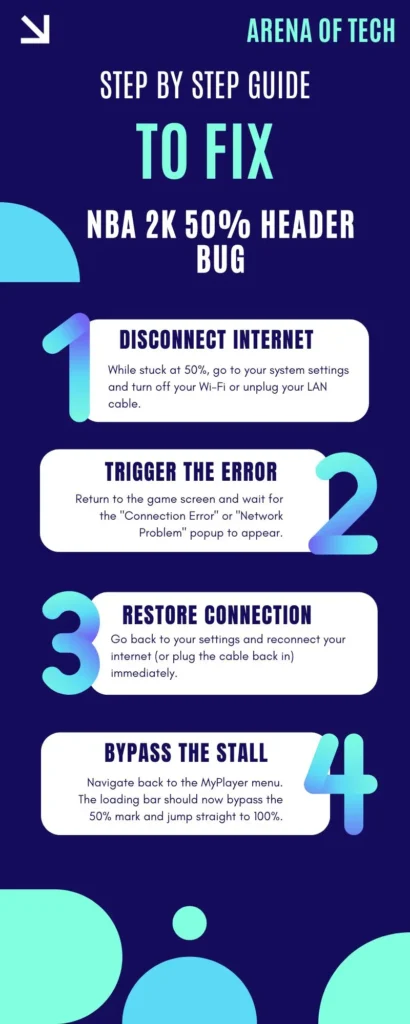
Follow these 4 steps to bypass the 50% loading error in NBA 2K24.
The Natural Light Rescan (Most Effective for most players, including me)
-
Assuming the quick internet toggle fix didn’t work for you, you should definitely try to scan your face again, follow our guidelines to make sure you don’t get stuck or confused.
-
First, delete your current face in the My2K app, and then move outside or stand near a window to make sure you have natural light in your environment.
Note: Avoid harsh indoor yellow bulbs.
- Now, rescan your face and make sure there’s no shadow on your nose or forehead. When the app shows “upload successful”, then restart the console and try the header builder again.
Clear the System Cache (Most effective for Xbox & PS5)
Very often, users have reported that residual files in their console’s temporary storage were blocking the header builder, and clearing it fixed the issue for them.
For PS5: Turn off the console > Hold the power button until you hear two beeps > Select Clear Cache and Rebuild Database.
For Xbox: Go to Manage Game & Add-ons > Delete Reserved Space (Note: Do NOT delete “Everywhere,” only “From Console”).
Cloud Storage Sync (Most effective for PC / Steam)
For my PCmasterrace guys, the infinite 50% or 96% loop is often a Steam Cloud error. We haven’t received a “lot” of responses for this, but there are a few who claim that just toggling Steam Cloud on and off fixed it for them, so here are the steps you can follow.
-
Right-click on NBA 2K24 in the Steam application.
-
Head to Properties > General and toggle Steam Cloud OFF.
-
Launch the game, enter the builder, and save.
-
Exit the game and turn Steam Cloud back ON to sync the fresh, working save.
Note: If this has fixed your game, do make sure to comment below so other gamers always stay updated.
The MyTeam Bridge Fix (Less likely, but it does work for around 20% of gamers)
This fix requires users to load the game in a different game mode, which can potentially bring the server connection back to life, while it is less likely, but it’s never a no. Here are the steps.
-
First, open MyTeam from the main menu.
-
Now wait for the MyTeam daily rewards or packs to load.
-
Exit back to the main menu and immediately enter MyCareer.
-
The head builder should now pull the data from the server without stalling.
Don’t let a 50% loading bar ruin your grind. From the fixes I’ve mentioned above, I’m sure at least one is going to fix your game. If you found this guide helpful, check out arenaoftech for more

Darby
Gaming Guides & eSports Columnist known for meticulously crafted, easy-to-follow gaming guides for players of all skill levels.